NeptunePlay Mobile UK: Browser Experience, iPhone and Android
 Available in GB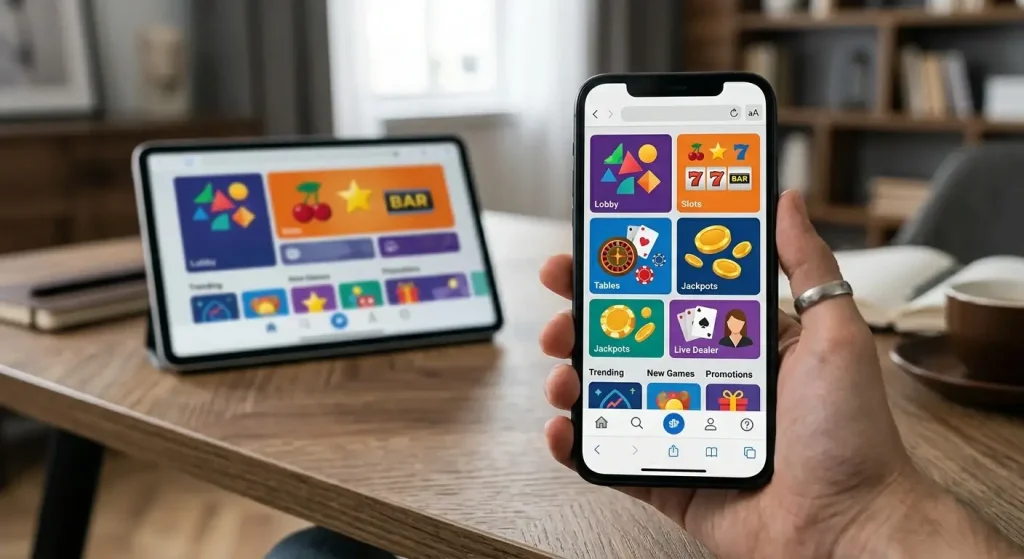
NeptunePlay does not currently have a dedicated native mobile app verified for iPhone or Android. UK players use the casino through a mobile browser instead. That means there is no required App Store or Google Play download: you open the site in a compatible phone or tablet browser, sign in and use the mobile version of the service.
The browser-first setup still supports the core casino experience, including access to games and the account environment. NeptunePlay also includes a live casino. The main practical question is what browser-first access changes on iPhone, Android and tablets.
Table of Contents
- NeptunePlay app or mobile website?
- What browser-first access means on iPhone
- What browser-first access means on Android
- Games and live casino on mobile
- Account access and cashier use in a mobile browser
- Why a browser can be simpler than a native app
- Mobile security checks worth making
- Registration on mobile
- How to judge the mobile experience yourself
- How to verify a future NeptunePlay app claim
- Using NeptunePlay on mobile without a native app
NeptunePlay app or mobile website?
The direct answer is mobile website. Browser access is available, while no dedicated native NeptunePlay app is currently verified. That distinction matters because unofficial pages can use the word “app” loosely for a shortcut, web app or simple mobile website.
A native app normally has a store listing, publisher identity, installation package and update process controlled through the operating-system ecosystem. Those elements are not currently verified for NeptunePlay. The safe route is therefore to use the mobile browser rather than searching for an installer on an unrelated site.
No official NeptunePlay download button, app-store rating or native-app installation path is currently verified.
What browser-first access means on iPhone
On an iPhone, browser-first access means opening NeptunePlay through a standard web browser and signing in to the same account used elsewhere. There is no need to install a separate casino application.
The practical advantage is that the site does not need device storage for a native app package and updates to the casino interface can be delivered through the website. The trade-off is that you do not get native-app features merely because you are on iOS. Any claim about push notifications, Face ID integration or a dedicated App Store build would need separate verification.
If you create a home-screen bookmark to a website, treat it as a shortcut unless the operator clearly identifies it as something more. A bookmark is not evidence that a native iOS app exists.
What browser-first access means on Android
The same principle applies on Android. The supported route is the mobile browser, not a dedicated Android package. That means there is no need to enable installation from unknown sources or download an APK from a third-party website.
This point is especially important for security. Casino-themed APK files found through search can be difficult to authenticate. Without a verified official Android distribution channel, installing a package from an unrelated domain creates unnecessary risk.
Use a current mainstream browser, keep the operating system updated and check that you are signing in to the correct service before entering account credentials.
Games and live casino on mobile
NeptunePlay includes a live casino, and the broader casino service is available through mobile browsers. For most users, that means the phone is a second screen for the same account rather than a separate mobile product.
Live casino is the area where device conditions matter most. A stable connection, enough screen space and reliable audio can make more difference than whether the service is wrapped in an app. If a live stream becomes unstable, moving from a weak mobile connection to reliable Wi-Fi is often more useful than repeatedly reloading the table.
The games overview covers the broader game catalogue, while the live-casino guide focuses on provider and table context without duplicating this mobile explanation.
Account access and cashier use in a mobile browser
A browser-first casino can still provide access to login, account settings and cashier functions. The key difference is delivery: those tools are presented as responsive web pages rather than native app screens.
For payments, the same verification discipline applies on mobile as on desktop. A payment option visible on one device should not be assumed to have different rules simply because the screen is smaller. Check the live cashier for the method, currency, amount and any verification prompt before confirming a transaction.
For the verified payment mix and the current £10 minimum deposit, use the payment methods guide. This mobile page does not repeat a full banking table.
Why a browser can be simpler than a native app
For some users, browser access is simpler because there is nothing to install and no separate app version to maintain. A saved bookmark can make repeat access quick, while the website itself handles interface changes.
That simplicity should not be confused with superior performance in every situation. Native apps can have their own advantages when they are well designed, but NeptunePlay’s current setup is browser-first, so the more useful question is whether the mobile site works for the activities you actually use.
If your priority is occasional account access, checking the cashier or playing a supported game on a phone, the absence of an app may be minor. If you specifically want a store-managed application, offline assets or native notifications, that preference matters because those features are not currently verified.
Mobile security checks worth making
- Use the legitimate NeptunePlay web address rather than an APK mirror or download directory.
- Keep your browser and phone operating system updated.
- Do not save passwords on a shared device.
- Avoid entering credentials after following an unexpected message or advert.
- Use the account’s own cashier and verification flow for payment or identity steps.
- Sign out if you use a device that other people can access.
These checks are more useful than assuming an app icon automatically makes a service safer. What matters is whether the login and payment flow belongs to the legitimate operator environment.
Registration on mobile
Because the service is available through mobile browsers, account access does not depend on owning a desktop computer. Registration and later verification still belong to the account process, not to the mobile-device category itself.
Do not infer that mobile registration means verification is lighter or faster. Identity checks can still apply regardless of the device used. The account setup guide covers that process and the UK context separately.
If you start registration on one device and later sign in on another, keep the account details consistent. Device changes should not become a reason to create duplicate accounts.
How to judge the mobile experience yourself
A useful mobile test takes only a few minutes. Check whether navigation fits the screen without horizontal scrolling, whether game categories are easy to reach, whether the account area remains readable and whether the cashier presents amounts and methods clearly. For live casino, test connection stability before committing to a longer session.
Also check comfort rather than just speed. Small text, dense menus or an awkward cashier can matter more over time than a fast first page load. A review can describe the delivery model, but only your own device and connection can show how the site feels in regular use.
How to verify a future NeptunePlay app claim
Because no dedicated native NeptunePlay iOS or Android app is currently verified, a future claim that an app has appeared should be checked before installing anything. Start with the legitimate NeptunePlay website and look for a direct link to the relevant official store listing. Then compare the publisher identity shown by the store with the operator information available from the site and the current regulatory record. A search result, advert or third-party download page is not enough on its own.
On Android, avoid treating an APK file as official simply because it uses the NeptunePlay name or artwork. A package offered outside a verified distribution route can request permissions or capture credentials in ways that a normal browser session does not. On iPhone, a home-screen shortcut can look like an app icon while still being only a saved website link. Neither situation proves that a native application exists.
The same check applies to store search results that use similar names. Confirm the destination and publisher before signing in or entering payment details.
This check also helps if NeptunePlay changes its mobile delivery model later. The useful question is not whether a page calls something an “app”, but whether there is a verified native distribution channel tied back to the legitimate service. Until that exists, the browser remains the clearer route because the account, cashier and supported casino content can be reached without installing a separate package.
Using NeptunePlay on mobile without a native app
The practical position for UK users is straightforward: NeptunePlay is available through mobile browsers, while no dedicated native iPhone or Android app is verified. You do not need an app download to reach the casino, account environment or supported live-casino content.
Use the browser route, avoid unverified app packages, and recheck the operator’s official distribution channels if a native app appears in the future. For what you can play, continue to the games overview; for funding from a phone, see the mobile payment options; for account setup, use the registration guide. For broader context, see the NeptunePlay review.